

Checklist Template
On this page
1. Quick Overview
Purpose: The checklist Template sheet is a template designed to create checklists. The checklist importer can be used to import the checklist spreadsheet importer into OPUS
2. Step-by-Step Instructions
 Download the Excel import template by clicking on the provided link: OPUSChecklistTemplate.xlsx.
- Fill in the required information in the Excel spreadsheet. Ensure all compulsory fields are completed.
- Rows and Columns with a Red Banner are considered Mandatory and must be captured
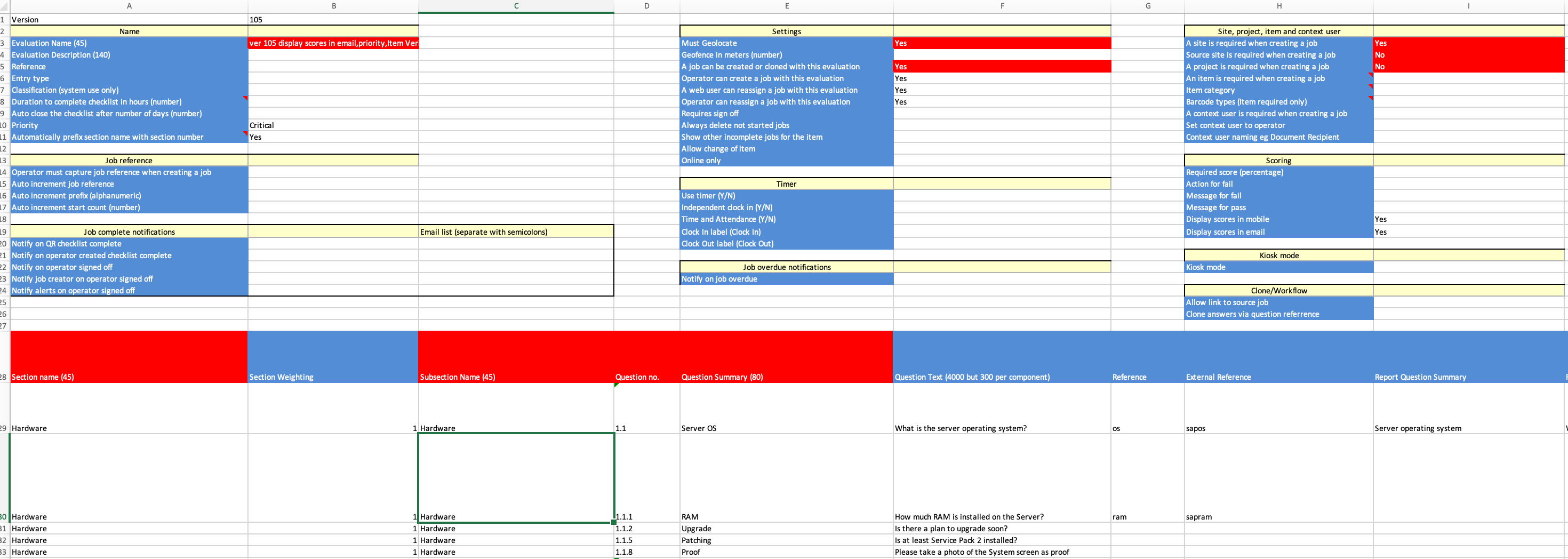
- Once the spreadsheet is filled out, log in to OPUS as an administrator and navigate to the "Checklist" section on the left menu panel
3. Tips and Tricks
Best Practices: Double-check the data in the spreadsheet before importing to ensure accuracy.
Additional Resources
- Refer to the OPUS documentation or contact the support team.