

OPUS Release Notes - March 2026
On this page
We are pleased to share the latest version of OPUS released on 2–3 March 2026. This update contains a lot of improvements, so let's start it right away with the major changes:
Major Features
🗂️ Redesigned Job Details Page — Rebuilt from the Ground Up
The Job Details page has been completely rebuilt — one of the most-used screens in OPUS. The redesign is not cosmetic: it reflects a fundamental rethink of how job information is structured, prioritised, and presented to the people doing the work.
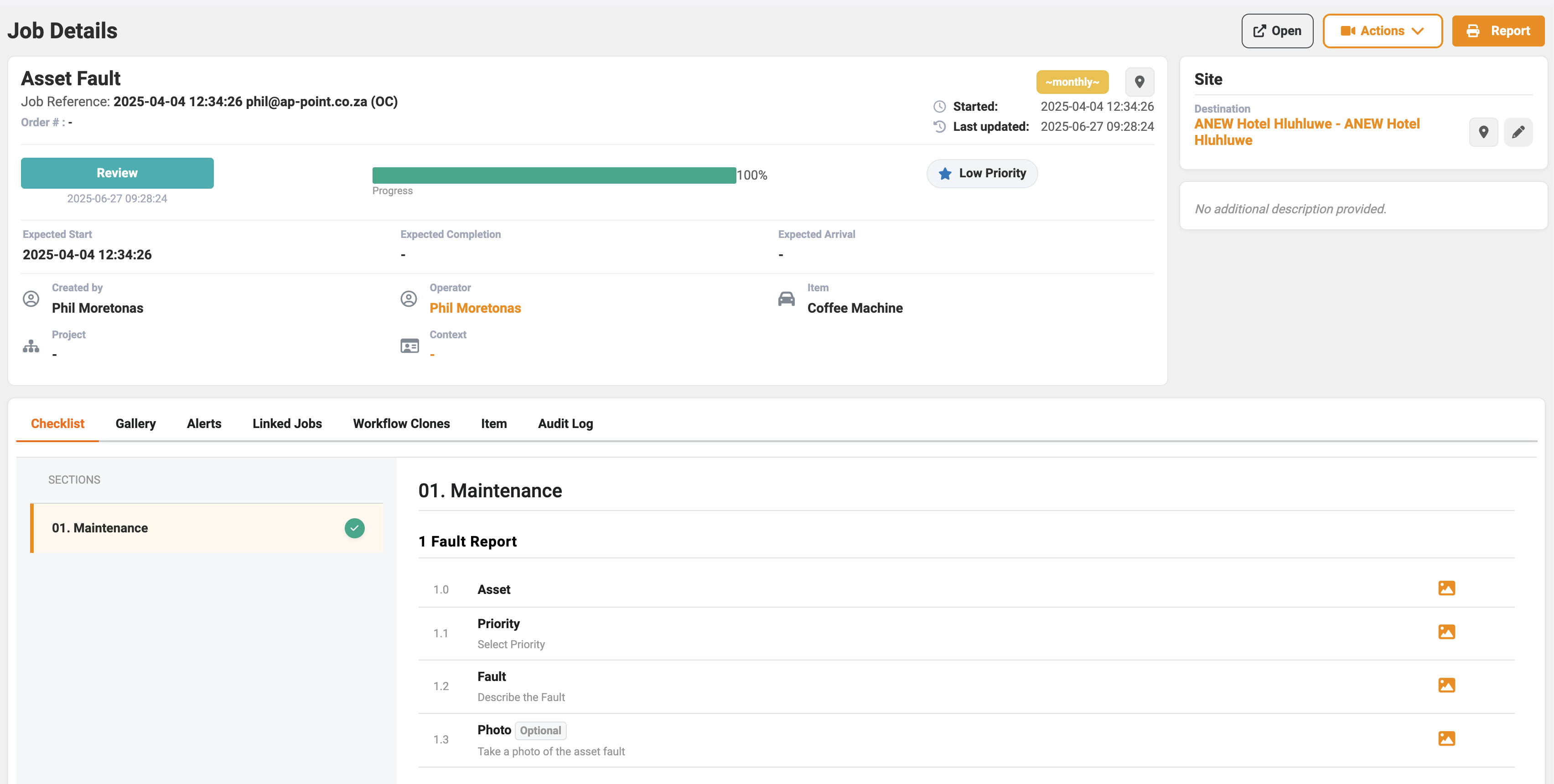
The new layout establishes a clear left-right split that mirrors how ops users actually think about a job. The left panel carries execution and responsibility — who ran it, who it's assigned to, and what progress has been made. The right panel carries location and context — the site, destination, and supporting detail. Nothing fights for attention.
People and project information is now intentionally grouped: Operator and Created By sit naturally together, the assigned employee reads clearly as the job owner, and project is correctly demoted to contextual data rather than competing with operational fields.
Status hierarchy has been corrected to communicate state before detail: Priority → Tag → Review status → Progress. This is the order operations users need — they assess state first, then drill into detail.
The result is a screen that is faster to scan, cleaner to operate, and — most importantly — trustworthy.
📧 More Reliable Email Delivery
Report emails, job notifications, and system alerts are now sent through a new, higher-capacity email service. Emails reach inboxes faster, more consistently, and at scale — even during peak activity.
☁️ Faster Image and Document Loading
Photos, attachments, and company documents now load directly from cloud storage rather than through the OPUS server. Reports with large images open faster, job galleries are more responsive, and the system handles more users without slowing down.
🗄️ Faster Reports, Built to Scale
This release includes the foundational infrastructure and development work to separate reporting from day-to-day operations, so that dashboards and custom reports no longer compete with live job activity. This change will not be active on day one — the rollout will happen in the period following this release. When it does go live, users will notice faster report load times and improved overall platform stability under load.
🔄 A Faster, More Stable Web Experience
Under the hood, the web platform has been significantly updated. Pages load faster, reconnect more smoothly when your connection drops, and the overall experience is more consistent across browsers. These changes also clear the path for continued improvements to come.
🔐 Flexible Login for Multiple Organisations
OPUS can now direct users from different organisations to the correct login provider automatically. Administrators can configure this without code changes, making it straightforward to add new organisations or domains going forward.
🚀 Coming Soon — Asset Management, Notifications & Overview Pages
Alongside the infrastructure work in this release, we have been developing significant updates to three areas: Asset Management, the Notifications experience, and Overview Pages. These features are ready and built on top of the foundational changes being delivered now — they will be rolled out in the period immediately following this release once the infrastructure is in place.
You will hear more about these as they go live.
Minor Enhancements
Web
- **Email links open the app directly:** Tapping a job link in a notification email on your phone now opens it straight in the OPUS app rather than a browser.
- **OPUSmedia SMS links updated:** SMS links for OPUSmedia documents now route correctly on all devices, opening the app or the correct document as expected.
- **Audit log entries are cleaner:** Filter activity in the jobs grid is now only logged when a filter is actually used, reducing clutter in audit records.
- **Overview page shows checklists once:** Fixed a display issue where shared checklists were appearing more than once on the overview page.
- **Generic sub-company importer:** A reusable importer for companies with multi-level store structures is now available under Admin → Importers.
- **Support admin menu reorganised:** The OPUS Support admin menu has been grouped into logical sections, making it faster to navigate for administrators.
- **Jobs grid loads faster under load:** Improved how job data is queried, reducing slowdowns during peak usage.
- **Variance page timeouts resolved:** Fixed a blocking query on the recount and adjustments page that was causing timeouts during busy periods.
- **Images load once, not twice:** Alert images and attachments were previously being loaded multiple times on certain pages. This has been corrected.
- **Custom reports can access images from all locations:** Custom reports now find photos wherever they are stored, ensuring images appear correctly regardless of where they were captured.
- **Company logos carried across to new storage:** Company logos have been migrated to cloud storage as part of the broader infrastructure update.
- **Employee reassignment returns the right people:** The user list shown when reassigning a job now correctly reflects who is eligible for that role.
- **Administrator changes are now audit logged:** Actions taken by administrators are now captured in the audit log for traceability.

### Mobile Apps

- **New 'Reset Data' option in the app menu:** Users can now clear and re-download their sites and items data directly from the menu, without needing a full device reset. Useful when a sync issue leaves stale data on the device.
- **Notifications now show links and open them:** Notifications that include a URL now display the link and open it when tapped. Previously the link was hidden and non-functional.
- **Signing off a job removes it from the device immediately:** After successfully signing off a job, it is now removed from the device straight away rather than waiting for the next sync. This prevents the same job from being signed off twice due to a slow connection.
- **Pasting text into job fields no longer freezes the app:** Copying content from another app and pasting it into OPUS text fields was causing the app to freeze. This has been resolved.
- **Comments dialog stays open when tapping outside it:** The comments dialog no longer closes if you accidentally tap outside it, preventing loss of work in progress.
- **Android updated to meet 2026 device requirements:** The PDF renderer in both OPUS4business and OPUSmedia has been upgraded to meet Android's new memory requirements, which are being enforced across all Android apps from 2026.
- **New store links now appear after syncing:** Stores newly linked to a user were not appearing in the app until a full device reset. This now resolves after a normal sync.
- **OPUSmedia History screen loads faster:** The History screen in OPUSmedia was taking around 30 seconds to load. This has been significantly improved.
- **Registration error messages are now readable:** On the OPUSmedia registration screen, error messages were overlapping the field labels. This has been corrected.
- **OPUS4manager site search clears correctly:** Closing the site selection popup in OPUS4manager now clears the search field as expected.
Bug Fixes
Web
- Workflow completion emails were being sent more than once: In some cases, when a job was signed off and retried due to a connection issue, the completion email would be sent multiple times to the same person. This has been fixed.
- Jobs were occasionally being signed off twice: A timing issue could result in a job being recorded as signed off twice in quick succession, without the user doing anything twice. The root cause has been resolved.
- Reassigning a job showed too many users: When reassigning a job, the list of available operators was not filtered to those with the correct access. Users who shouldn't have been assignable were appearing. This is now fixed.
Mobile Apps
- PDF attachments weren't opening on Android: Tapping a PDF attachment on Android devices was not opening the file. This has been resolved.
- Notifications were missing from the Notifications page: Notifications were arriving but not appearing in the Notifications list on the app. Fixed on both Android and iOS.