

OPUS Release Notes - June 2026
On this page
We are pleased to share the latest version of OPUS released on 11 June 2026. This update contains a lot of improvements, so let's start it right away with the major changes:
This document outlines the new features, enhancements, and resolved issues included in the June 2026 OPUS platform release. It covers the web dashboard, mobile applications, analytics, and backend infrastructure components.
Highlights of this release include a completely redesigned web Overview Page, expanded job assignment capabilities, hierarchical site roles with automatic scoped visibility, major mobile performance improvements, and continued migration of the web dashboard to the Blazor platform.
Major Features
🏠 New Overview Page
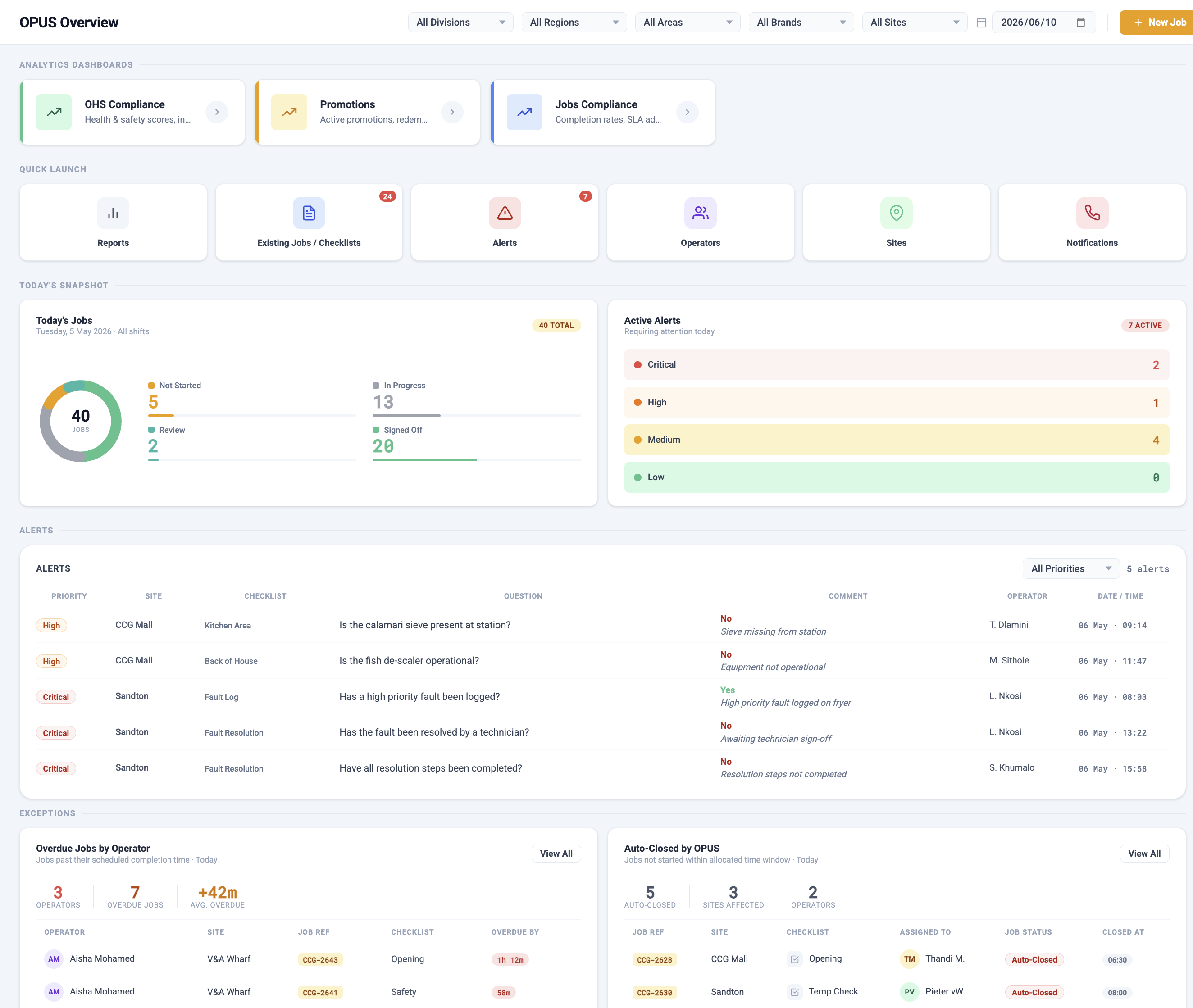
The OPUS web dashboard Overview Page has been completely redesigned. The new page replaces the previous overview with a rich, at-a-glance operations dashboard — giving managers and supervisors an immediate, personalised view of what is happening across their sites, teams, and checklists.
The redesigned page includes a live Today's Jobs snapshot — a visual donut chart breaking down all jobs for the day by status (Not Started, In Progress, Under Review, and Signed Off) — alongside an Active Alerts panel showing outstanding alerts by severity level (Critical, High, Medium, and Low). A Jobs by Site bar chart provides a quick view of completion rates across locations, and a Quick Launch grid gives one-click access to frequently used areas such as Reports, Alerts, Operators, Sites, and Notifications.
A site filter across the top of the page allows managers to focus the overview on their area of responsibility. Linked analytics dashboards can be pinned as cards at the top of the page, allowing quick navigation to BI reports without leaving the overview.
Overview pages can now be configured per site role, so different types of managers and supervisors see a page tailored to their context. Franchise operators, area managers, and executive users can each have a different default view. The overview now connects directly to the PostgreSQL analytics database, delivering significantly faster load times — especially for large multi-site deployments.
👥 Flexible Job Assignment — First Responder Mode
It is now possible to assign a single job to multiple users simultaneously. When a job is shared across a site role group, the first person to open and begin the job takes ownership — the job is automatically removed from all other assignees' queues. This is known as First Responder mode.
This capability is particularly useful in environments where multiple operators may be available to action work, and speed of response matters. Configuration is managed at the checklist level through the checklist admin screens and the data importer.
Unassigned jobs set to show in the inbox are handled correctly: urgent jobs always appear, and the system correctly removes jobs that no longer apply after a first responder has claimed them.
🏗️ Hierarchical Site Roles and Scoped Visibility
Site roles can now be structured in a parent–child hierarchy that mirrors how your organisation actually operates. A role can be assigned a parent role — for example, Store Manager sits under Area Manager, which sits under Regional Manager. This hierarchy is configured once in the site role administration screen and applies automatically across the platform.
Once a hierarchy is in place, each user's view of jobs, documents, and context users is automatically scoped to their position in that hierarchy. A user in a lower-level role will only see records that belong to their level and below — they will not see jobs, documents, or people linked to roles above them in the structure. This ensures that managers at each level see exactly what is relevant to their area of responsibility, without exposure to data that belongs to more senior roles operating across the same sites.
This is particularly useful in multi-tier organisations where field-level managers, area managers, and regional or national managers all operate across overlapping sites. The hierarchy removes the need for manual filtering rules or per-user configuration — visibility is determined automatically by the role structure. Organisations that do not configure a parent role are unaffected; the restriction only applies where a hierarchy has been explicitly set up.
📱 Refreshed Mobile App Home Screen
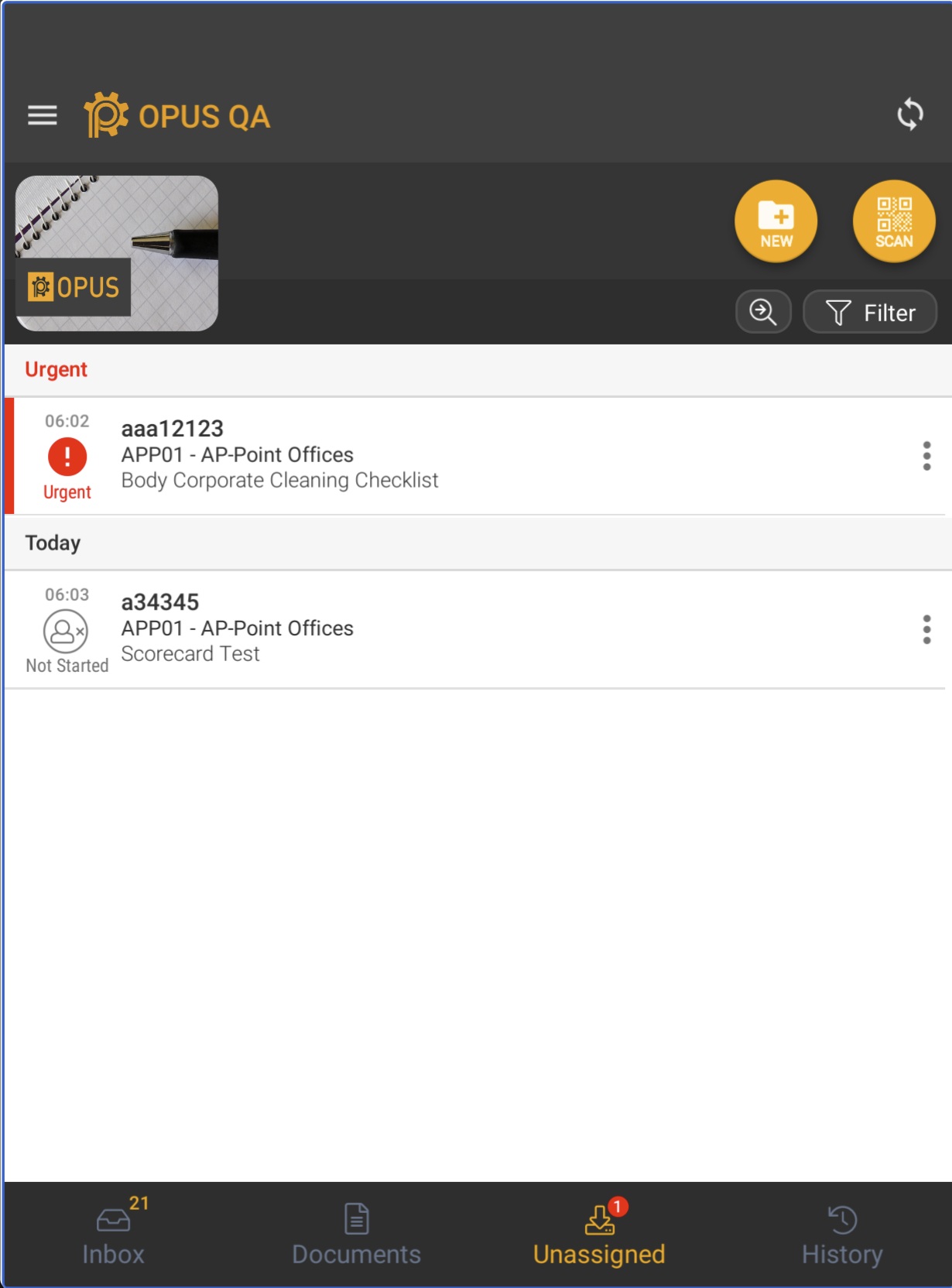
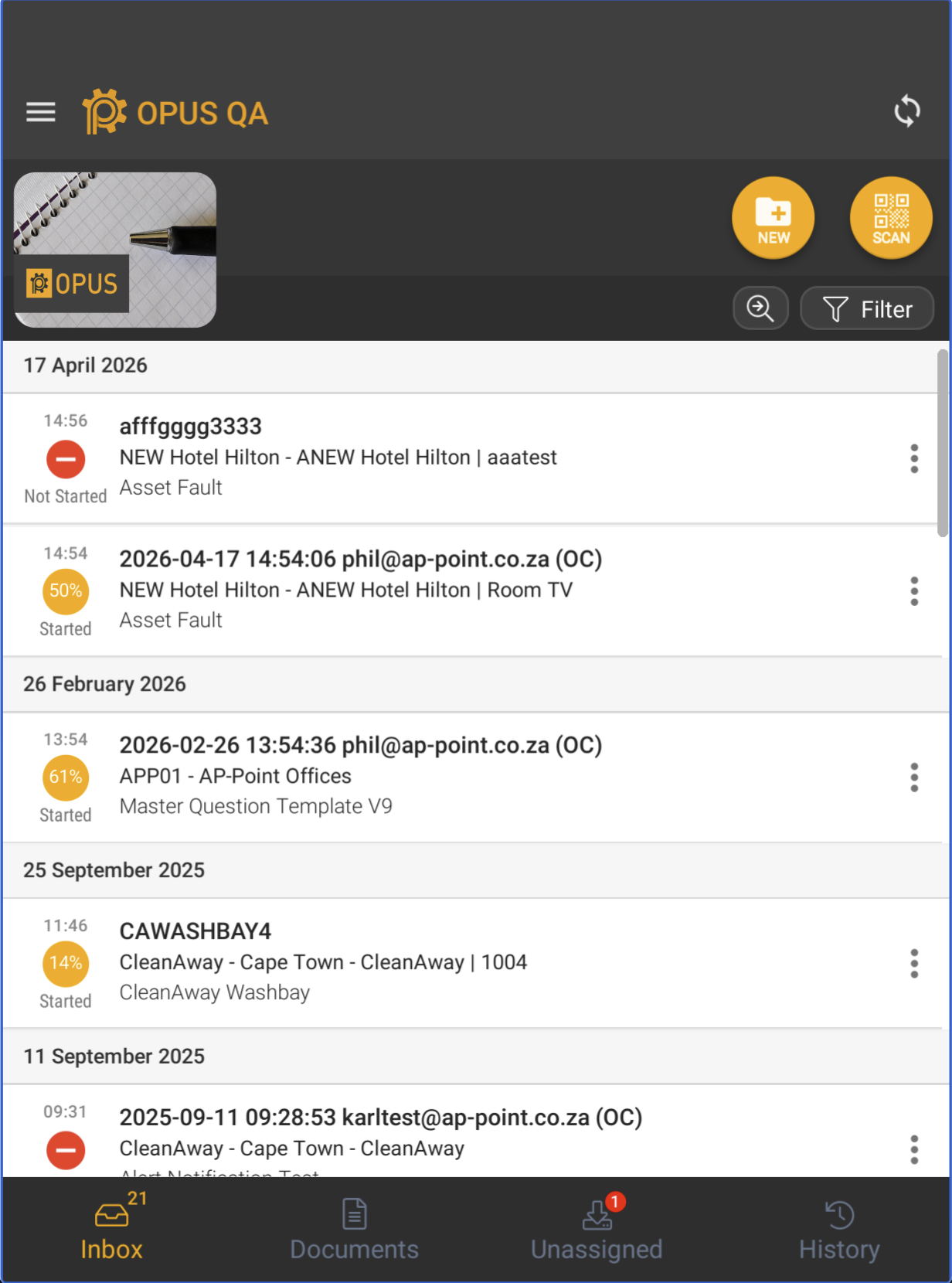
The OPUS4business mobile app has a completely refreshed home screen. The redesigned interface presents jobs and checklists in a cleaner, more modern layout that is easier to scan at a glance — particularly useful for operators managing multiple active jobs across busy shifts.
The new home screen improves the visual hierarchy of job information, making it faster to identify what needs attention and reducing the steps needed to open and start work. The update applies across both the native mobile app and the WebGL browser version.
🚀 Faster, More Stable Mobile App
Performance
The app synchronisation process has been substantially optimised for large deployments. Quick Sync — the process that checks for updated jobs and data on login and in the background — has been improved for users with large job volumes. This significantly improves the experience at the start.
Unity 6 Engine Upgrade
The underlying engine that powers the OPUS mobile app has been upgraded to the latest long-term support version. This ensures the app remains compatible with current and upcoming device requirements, continues to receive security updates, and benefits from the latest performance improvements.
A number of stability fixes were included as part of the upgrade, including resolution of a crash that occurred when adding multiple images to gallery-type questions in the WebGL version, and fixes for PDF viewing in the WebGL environment.
🔄 Faster, More Consistent Web Experience
The web dashboard continues its migration from the legacy AngularJS platform to Blazor, Microsoft's modern web framework. A significant number of pages and admin screens have been converted in this release, including the Analytics Dashboard viewer, which is now fully Blazor-based for improved performance and consistency with the rest of the platform.
The migration eliminates the need for users to manually clear their browser cache when new versions are released. Performance improvements are noticeable across the platform, particularly on grids and data-heavy screens.
The DevExpress Analytics Dashboard now supports CSS customisation, allowing dashboard components to be styled in line with each client's brand identity.
Minor Enhancements
Web Dashboard
- **Job Details page refresh:** The Job Details page has received a comprehensive interface update. All key action modals — including assign user, reassign job, send to operator, close, delete, add notification, edit tags, assign project, assign site, notes and instructions, recurring job settings, and the edit answers panel — have been redesigned with a consistent new look. The action menu is now uniform between the Jobs grid and the Job Details view, and the answer and gallery popups have also been updated.
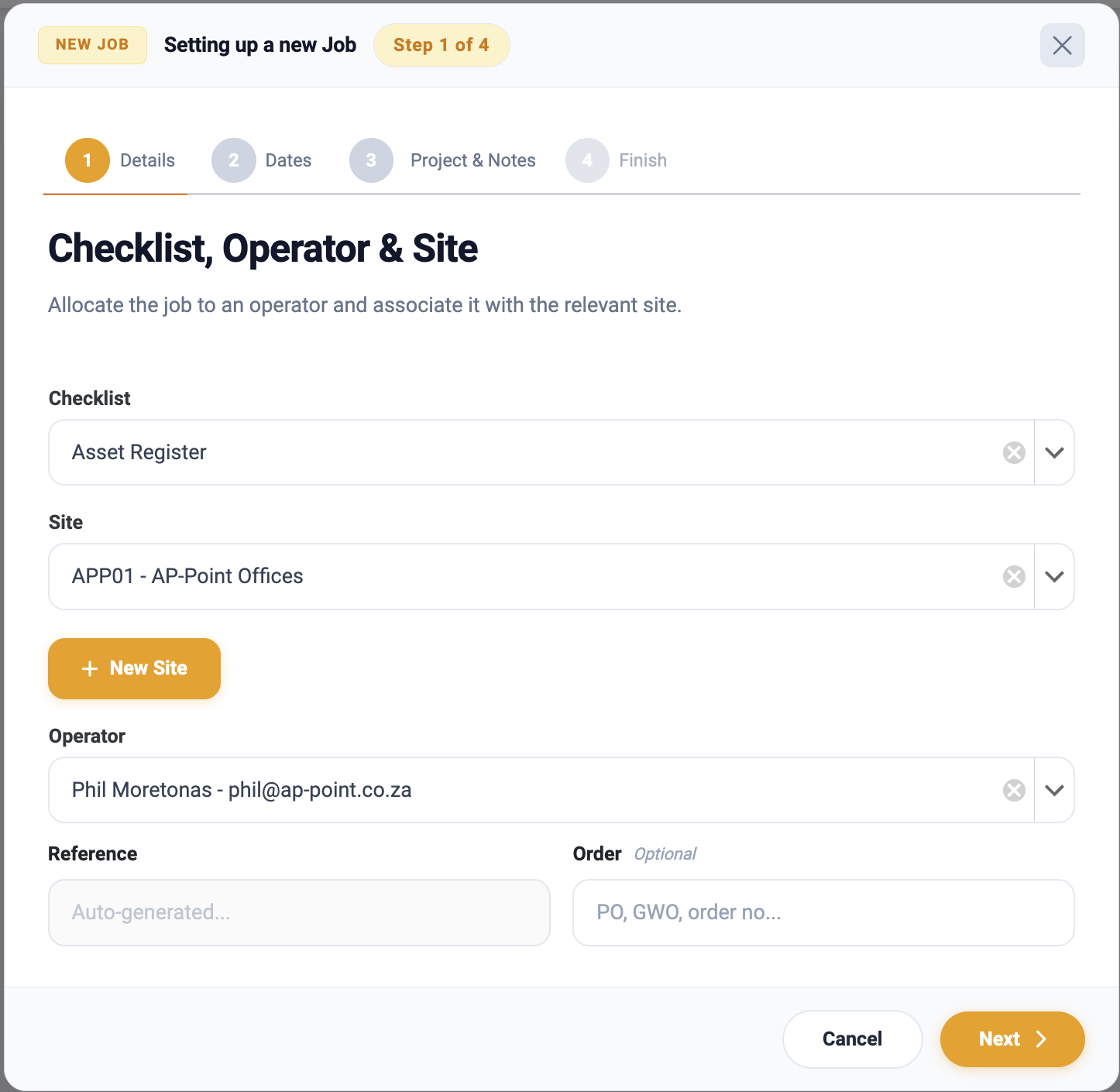
- **Clone and Quick Clone:** The clone and quick clone workflows have been updated with a new, more intuitive interface.
- **Pending job status:** Jobs marked as Pending are now clearly indicated on the Job Details page, so users can identify pending jobs without leaving the detail view.
- **Recurring Master job visibility:** Recurring master jobs now display a clear status on the Job Details page, distinguishing them from regular jobs at a glance.
- **Job Importer Role:** Users with the Job Importer role can now access the web dashboard as expected — previously this required full Admin access.
- **Site Role Reference:** Site roles can now be assigned an optional reference code, making it easier to map roles to equivalent job titles or roles in integrated external systems.
- **Usability improvements:** Switching between Active and Deleted views now correctly refreshes the displayed status. The Tags area on the User screen is now fully clickable across the entire block.
- **AI Model Configuration:** Administrators can now select the LLM model and settings (such as temperature) per question type, allowing cost and quality to be balanced based on the nature of each AI-assessed question.
- **AI Multi-Image Analysis:** The AI service can now receive and analyse multiple images in a single request, improving accuracy for checklist items where several images are captured together.
- **AI Prompt Caching:** Frequently-used AI prompts are now cached, significantly reducing AI processing costs and improving response times without any change to output quality.
- **Sage Connector:** The Sage integration has been enhanced to provide a more comprehensive and reliable connection, covering a broader range of data and improving overall integration consistency.
### Mobile Applications

- **AI Image Analysis in Repeating Sections:** AI-powered image autocomplete now works correctly within repeating subsections, without overwriting data captured in earlier sections.
- **History Sorting and Urgent Jobs:** The history view now correctly sorts and highlights entries. Urgent jobs are correctly surfaced and highlighted at the top of the list.
- **Ability to Edit Item on Workflow Jobs:** If a checklist allows item changes, users can now edit the item linked to a cloned or workflow-generated job directly on the mobile device.
- **Android Navigation:** Pressing the Android back button while a filter panel is open now correctly dismisses the panel.
- **Min/Max Validation on Number Questions:** Minimum and maximum value validation on numeric entry fields now works correctly when tapping the +/- buttons.
- **Single Sign-On from Web:** Launching OPUS Jobs Capture (WebGL) directly from the web dashboard now works without re-entering credentials, including when impersonating a user.
- **Urgent job handling in Unassigned:** Auto-closed urgent jobs are now correctly removed from the Unassigned list. All urgent jobs — including future-dated ones — are always shown at the top of the Unassigned list to ensure they are not missed.
- **Visual and layout improvements:** The home screen now displays the checklist count closer to its icon for a cleaner layout. The company logo display has been improved. Excess spacing at the bottom of the screen on Android devices has been reduced.
Bug Fixes
Web Dashboard
- Checklist Detail with Photos report was downloading without photos when accessed via the link included in an email workflow notification. The report now includes all photos as expected.
- Custom reports set up for sub-companies were not appearing on the app when the user switched to checklist or job view. This has been resolved — reports are now visible at sub-company level as intended.
- Error notification emails sent for analytics dashboards and custom report failures were sometimes unreadable due to special characters in the error body. These notifications now send as plain text, ensuring the full error detail is always visible.
- The job status badge on the Job Details page was compressing and becoming hard to read when the browser window was resized to a narrower width. The badge now displays correctly at all window sizes.
- The Checklist Workflow engine was failing when a workflow contained item categories with duplicate item codes. The engine now handles duplicate codes correctly and workflows run as expected.
Mobile Applications
- The mobile app was incorrectly allowing users to sign off jobs that had already been auto-closed by the system. This occurred when a user was working on the same job across two devices. The app now correctly prevents sign-off on auto-closed jobs.
- A workflow that generates a new job was throwing an error during the sign-off process on mobile. The sign-off now completes successfully and the follow-up job is created as expected.
- Users were unable to enter a forced comment on an answer that triggered an alert. The comment field is now correctly presented and accepts input.
- The log timestamp on certain jobs was not being updated correctly, causing some records to reflect an incorrect start time despite the job being in progress. Timestamp handling has been corrected.